
Graduate School
Final Aquila Approval
Final Aquila approval is achieved once the Graduate School approves a thesis, dissertation, or doctoral project in Aquila. A document's format can be revised any number of times, so long as the document is approved before the final Aquila approval deadline. Only formatting changes can be made after the document approval form has been submitted - no content changes can be made after the Graduate School has received the document approval form. Unapproved changes can result in withdrawal of a document and deferral of graduation. Failure to meet the final Aquila approval deadline can result in deferral of graduation.
Uploading Revisions to Aquila
To submit a revised document:
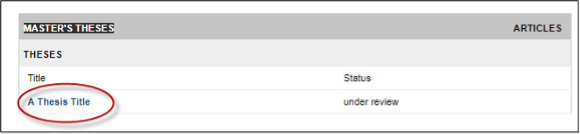
- Login to your Aquila account and click on the title of the submission.
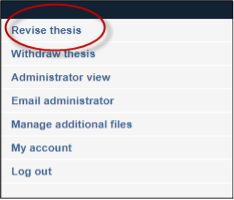
- In the navigation bar on the left-hand side, click “Revise thesis,” “Revise dissertation,”
or “Revise project.” The option selected will be based on the document type.
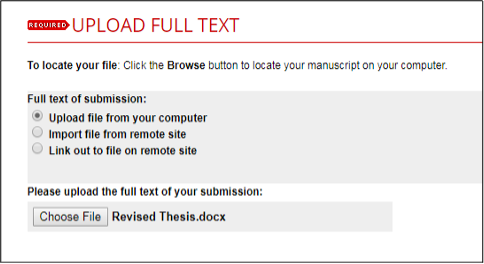
- The submission form that was completed upon the first submission will appear. Scroll
down to “Upload Full Text” on this page and upload the revised document.
- Click “submit.” Allow the submission to process before closing out the window.
- Contact the Documents%20Specialist to confirm submission of the thesis, dissertation, or doctoral project.
Note: The revision process might be repeated multiple times. All revisions will need to be completed and document will need to be accepted by the final submission deadline.