iTech
Faculty and Staff Teams Telephone Services - C455HD Physical Telephone Device
Page Content
Teams Telephone Prices (for a physical phone)
Make a Call
What are Softkeys?
Redial a Number
Put a Call on Hold
Transfer a Call
Forward Calls
3-way Conference Call
Teams Telephone Prices (for a physical phone)
|
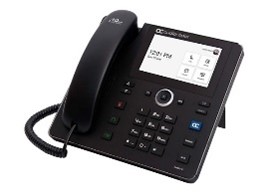
C455HD-DBW for use with KEM |
Multi-line VoIP telephone with speakerphone One-time new purchase: estimated at $450.00 |
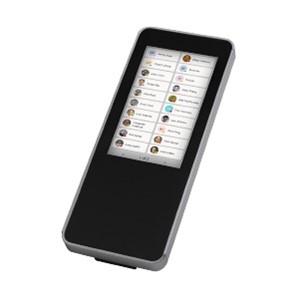 Key Expansion Module Key Expansion Module |
One-time new purchase: estimated at $250.00 |
| Analog Line | Not available with Teams |
Make a Call
- To make a call, pick up the handset and enter the phone number.
- Then press the call soft key.
- If you don't press the soft key, the number will automatically be dialed after three seconds.
- To call a phone contact, press the contacts button and select your contact.
What are Softkeys?
- It's important to note that in this case, the term softkeys refers to the actual icons on the screen itself and not buttons below the screen.
- The functions of these soft keys change based on the screen you're currently on with the label changing as necessary.
Redial a Number
- To redial a number, click the calls button from the home screen, go to either favorites or history and click on the number you'd like to redial.
Put a Call on Hold
- To put a call on hold and make another call, press the hold button and then the back arrow button.
- If you want to call the contact, press the contact button; otherwise, dial the desired number.
- To return to the held call, scroll to the top of the screen and tap on the call on hold.
Transfer a Call
- To transfer a call, press the transfer button and enter the number of the person you're transferring the call to.
Forward Calls
- To automatically forward calls to another number, from the home screen, click the three horizontal lines on the top left.
- Click on settings, then calling.
- Turn on call forwarding, select forward to, select contact or number, then new contact or number.
- To deactivate call forwarding, toggle call forwarding off in settings.
3-way Conference Call
- To make a three-way conference call, call the first participant.
- While on the call, select the icon portraying two people at the top right of the screen.
- Tap add people, select a contact or type in a number, and then dial that contact to add it to your conference call.