Student Help
Add or Drop a Minor
Page Content
1. Initial Navigation
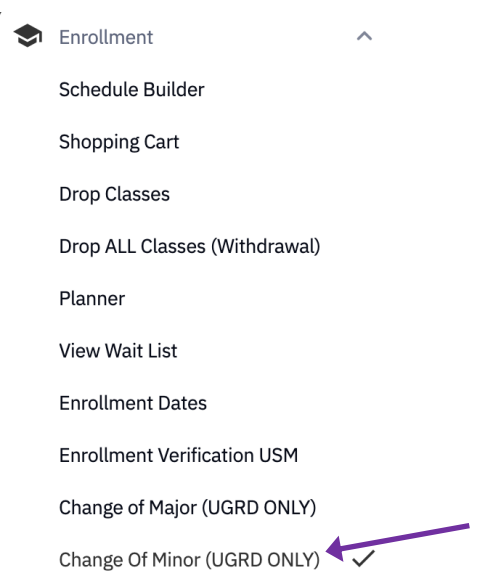
Within SOAR, navigate to the Enrollment menu. Select "Change of Minor."
2. Read and Accept Information
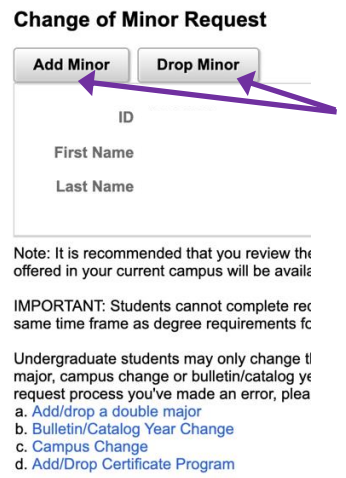
Read the provided information. If you wish to continue changing your minor, click the appropriate button.
3. Find Minor
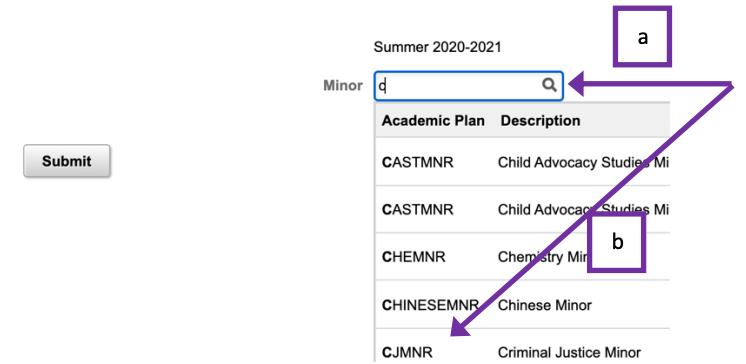
- Type in the first few letters of the of your desired major.
- Select the correct major from the corresponding list.
Once you’ve selected a minor, click the Submit button.
4. After Submission
After submission:
- SOAR will automatically navigate you back to your Student Center.
- You will receive a confirmation email stating that your change of minor request has been submitted. Allow the academic department 10 business days to review and process your request. If you have not received a follow-up email after 10 business days, please contact the department of your intended minor.

For emergency assistance, dial 9-1-1. Or view local emergency contacts for police, fire, hospitals, and mental health crises.
To report a broken link or suggest a helpful resource, please email Danielle%20Sypher-Haley.